
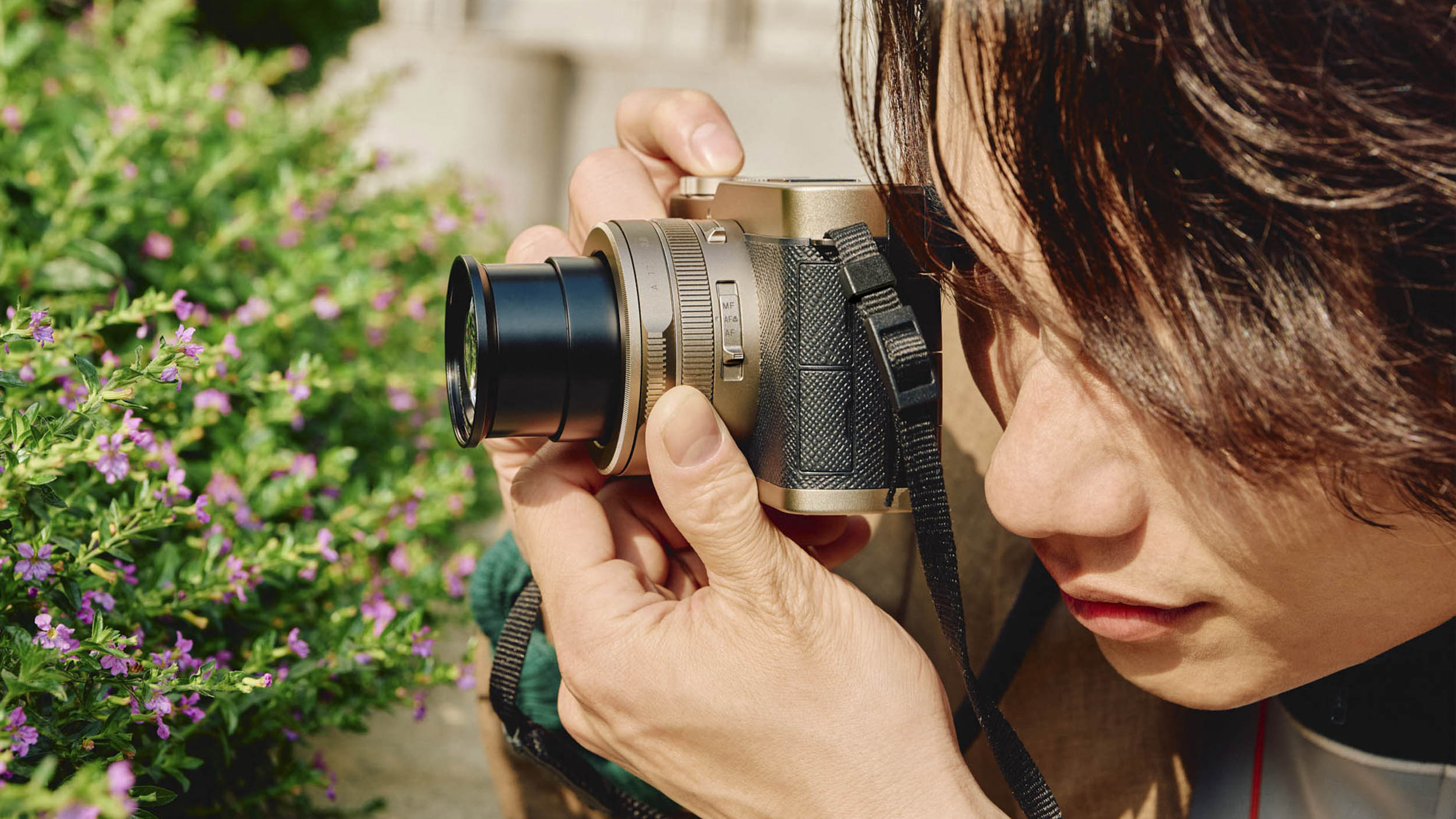
Such has been the fuss over the new Lumix L10 (or DC-L10) that it’s easy to overlook the fact that the camera is an up-dated version of the Lumix LX100 II (2018) which in itself was a development of the original LX100 introduced in 2014. The excellent Leica DC Vario Summilux 24-75mm f/1.7-2.8 Asph. lens also dates from September 2014, so that’s also no Johnny-come-lately. The current Leica D-Lux 8, which is based on the LX100 II, is essentially an updated version of an 2018 camera. Despite this, and all considered, the new Lumix L10 contrives to be something exceptional and deserves the furore it has stimulated since the launch in May this year.
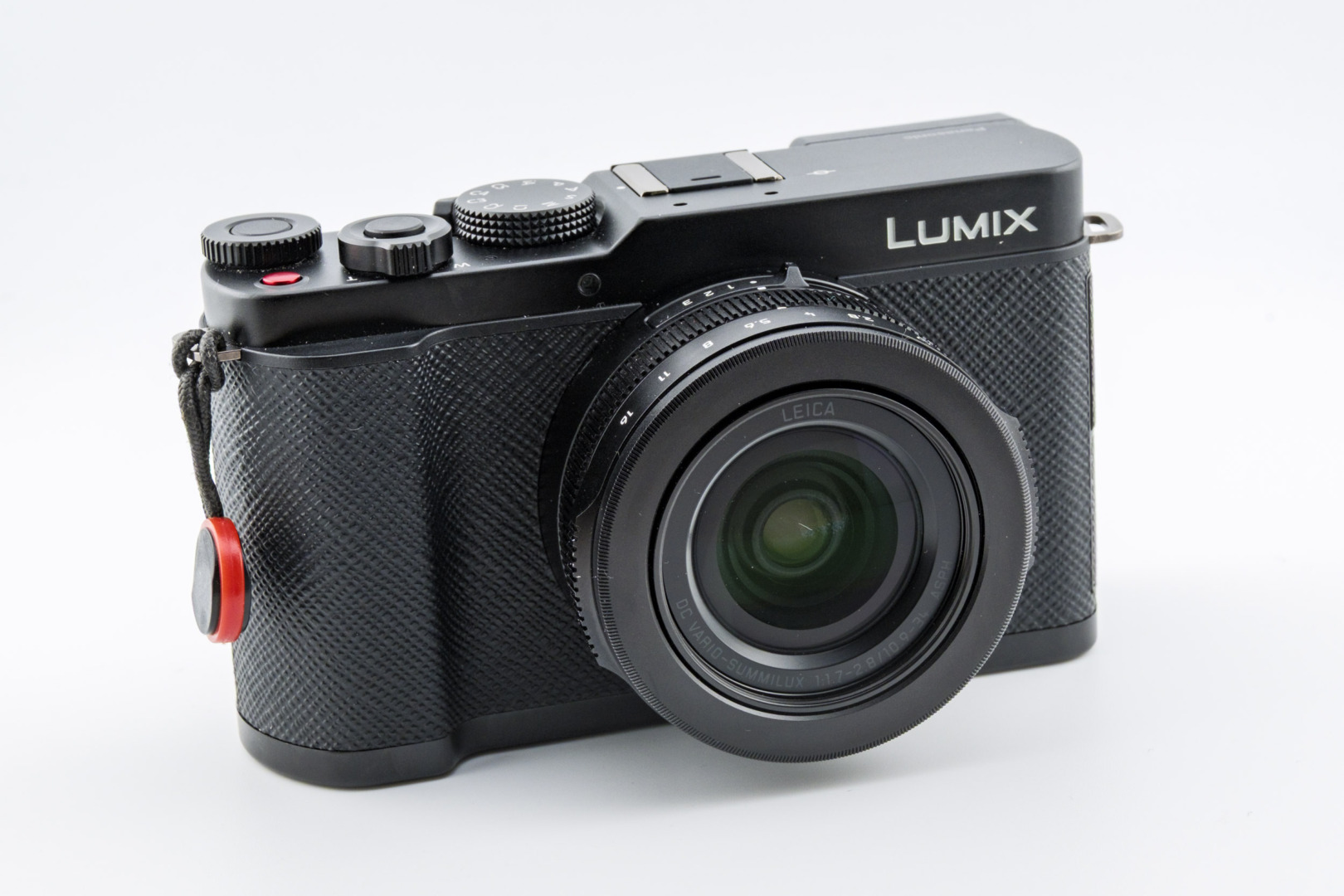
With this backstory in mind, however, I approached the L10 with some scepticism. This was especially so when I read that the new camera is likely to be a world beater that would outperform and outsell the king of the compacts, the Fujifilm X100VI.
Could this be so? Is the L10 such a paragon that it will take the compact photography world by storm? Despite these reservations, I have to admit that when I unpacked the new camera, I was immediately impressed. The L10 certainly looks like an LX100 (or, if you use a bit of imagination) a D-Lux 8. It’s bigger, but uses the familiar zoom lens.
Panasonic is clearly positioning this camera as a high-end, premium fixed-lens compact for enthusiasts and video creators. It’s for people who want a do-everything carry-everywhere camera with great video and the ideal “standard” zoom range of 24 to 75mm. It is launching at £1,299 or €1,499 (both including tax) and $1,499 (excluding tax) and is available in black or silver.
Body
The camera is decidedly bigger and heavier than the LX100 II and D-Lux 8. It is some 40 percent larger by volume and weighs 508g, compared with the 392g for the smaller cameras. But once you have it in your hand, this isn’t really all that noticeable. Unless you have both cameras side by side, the Lumix L10 feels very much like my old D-Lux 8, and has similar handling. Furthermore, it boasts a substantial handgrip, which means that it is more stable and easier to handle.

The camera feels sturdy and well crafted, with a nice heft to it. The lens is identical (except in a couple of respects, which I will outline later) to that of the LX100 and D-Lux cameras. Nothing new there for Leica enthusiasts, apart from the confidence that comes from knowing that, unquestionably, the optical performance will be good.
Unfortunately, the camera is not weather sealed and nor does it have in-body stabilisation. However, the lens, as before, features in-built optical stabilisation— a similar set-up to the Leica Q, for instance. Panasonic didn’t quantify the effect of the stabilisation as far as I can tell, but I have read unconfirmed suggestions that the saving is in the order of three to four stops.
Why is the L10 bigger than the LX100?
Panasonic has abandoned the compact size of earlier cameras. The L10 is bigger because of the need for more effective cooling, space for a larger-capacity battery, user-interface changes and a more robust chassis. In tackling the heat problem, Panasonic has taken note of the more advanced video capabilities, including new codecs, which require higher sustained processing throughout, and better heat dissipation than the old LX100 body allowed.
All this sounds convincing to me, and I willingly accept the penalties in return for the greatly enhanced performance.

Controls
The Lumix L10 has a comprehensive set of controls which allow access to most frequently used operations. On the rear, next to the finder, is a diopter control which I found very fiddly to operate. Thankfully, once set, it should not cause any further problems. I can imagine that this can be a nuisance if the camera is being used by more than one photographer.
To the right of the finder window is a dedicated EVF/LCD toggle button, which I always like. It saves having to assign one of the precious soft Fn buttons to this essential (for me) feature. Further along is a switch to move between still and video, with a third “S&Q” position (slow and quick) which is a dedicated mode for the capture of slow-motion or fast-motion time-lapse video directly in-camera. You learn something new every day. However, we don’t review video in our tests, and this is academic for still shooters.
The fully articulated rear screen is typical of Panasonic Lumix cameras and, in my view, is superior to the simple tilting screens use by some manufacturers, including Leica.
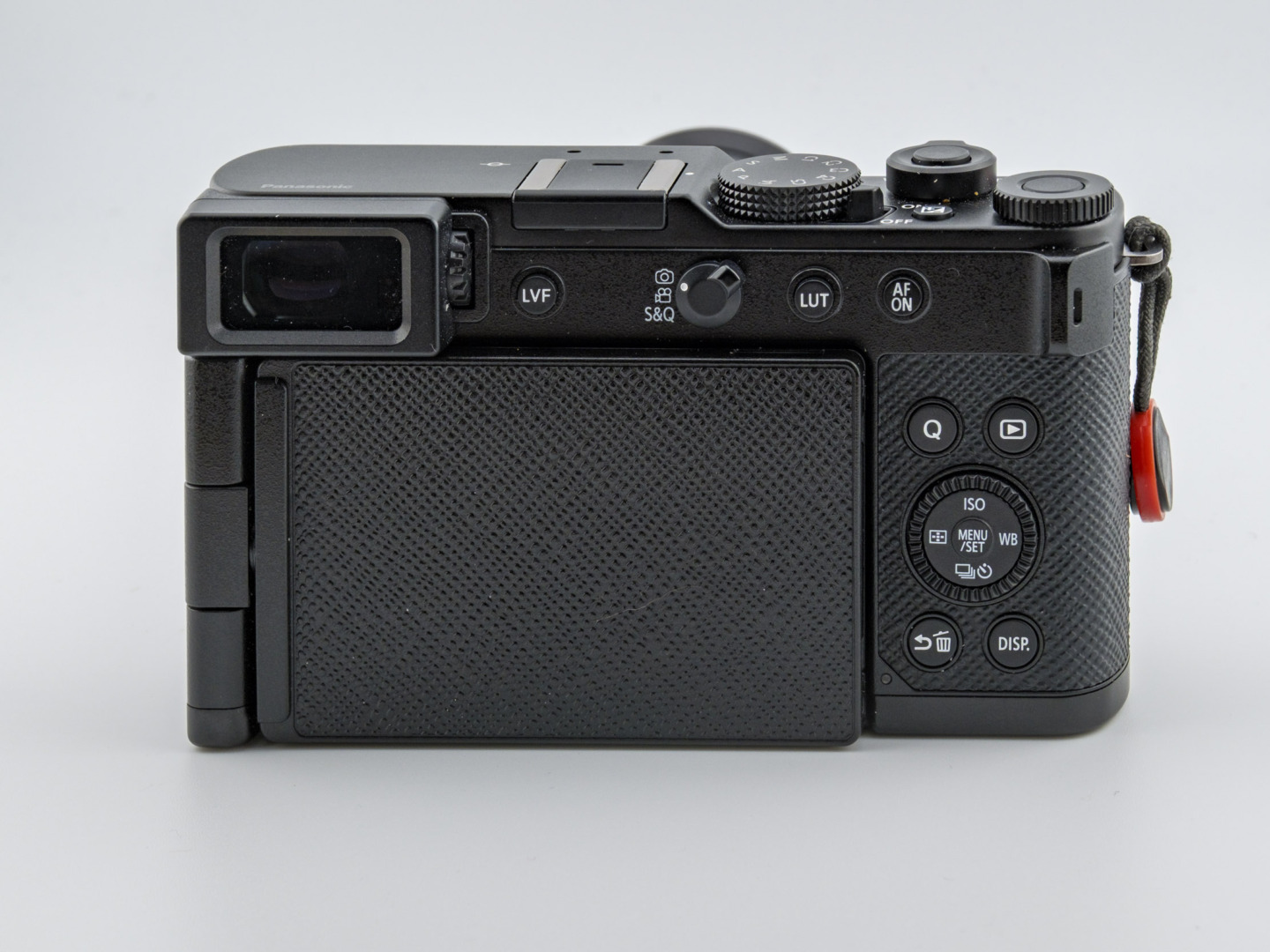
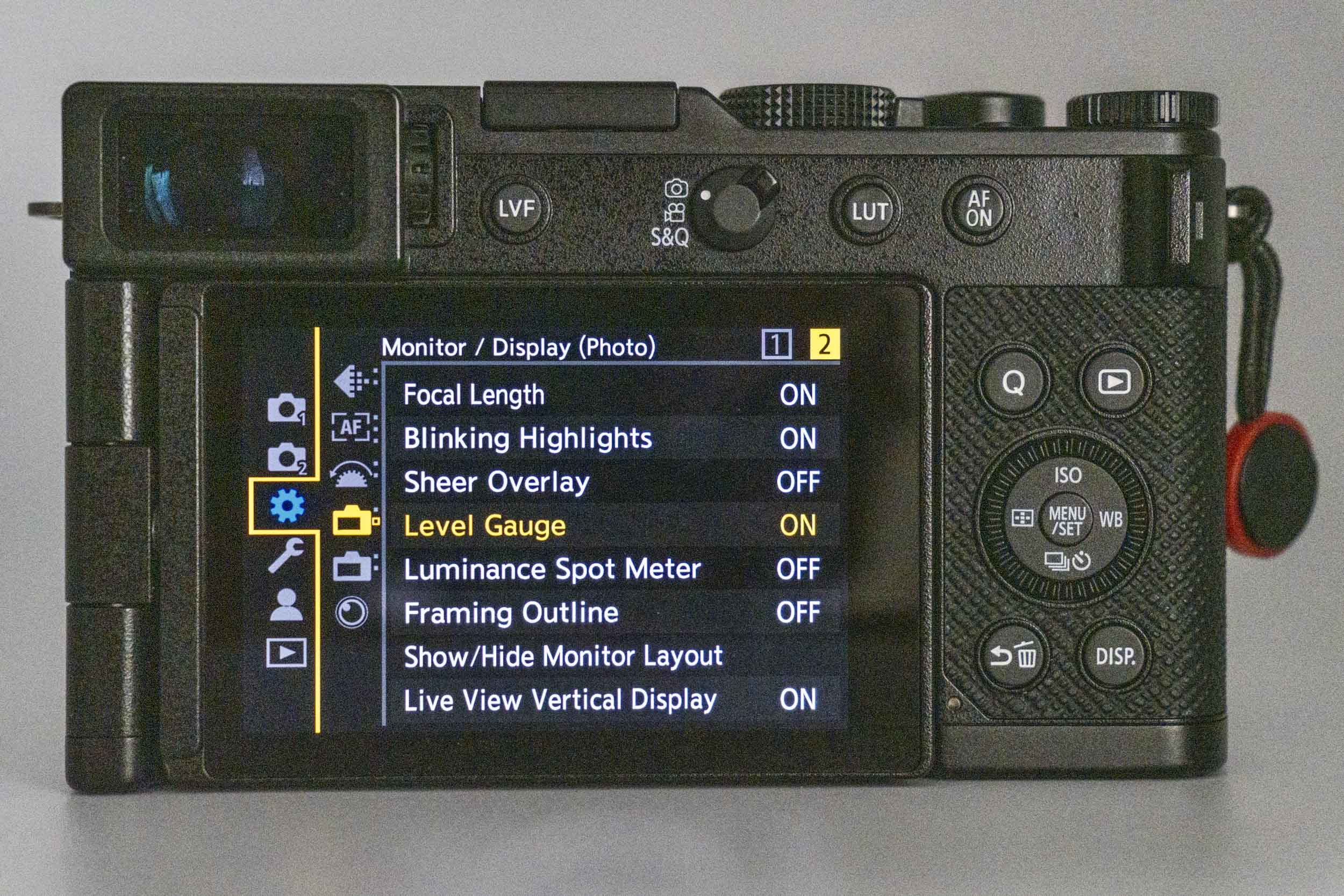
Further to the right are two buttons for LUT (pronounced “loot”) and AF. More on LUTs later. Next to the screen are four dedicated buttons (Quick Menu, Playback, Delete/Return, and Display) grouped around a traditional four-way pad. The lack of a joystick is notable; this function has almost become an essential for modern cameras, and I prefer a good joystick to the old four-way pad concept.
The fully articulated rear screen is typical of Panasonic Lumix cameras and, in my view, is superior to the simple tilting screens use by some manufacturers. It is adjustable for low and high shots, selfies (and vlogging) and can even be reversed completely to form a screenless back.
In the past, I’ve heard the need for mechanical reliability cited as a justification for using the simpler tilting screen design. Nonetheless, I’ve been accustomed to the articulated type, particularly on Panasonic Lumix cameras, for some years. I have had no reliability issues.
While I am often forced to turn off touch control on other cameras because of my overactive nose syndrome caused by left-eye dominance, I can simply reverse the screen of the L10, making it instantly nose-proof. Open it, and I have full access to touch controls. This small feature is far more significant than it appears.
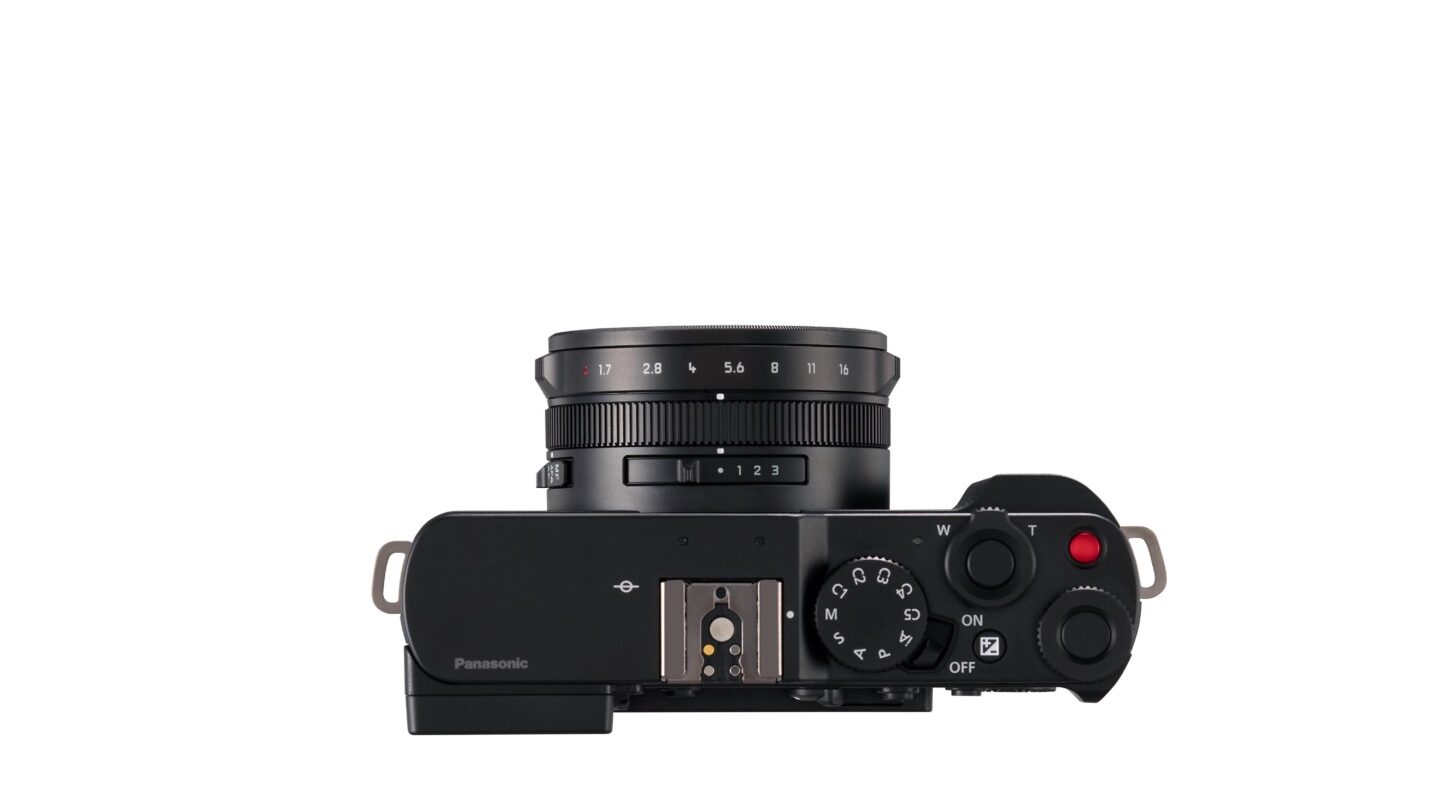
The top plate is a radical departure from the LX100II and D-Lux 8. Both these cameras featured a traditional shutter-speed dial, which many photographers are addicted to.
However, the Lumix L10 dispenses with this dial in favour of a PASM mode dial, with the addition of four custom settings. This mode dial is more attractive to videographers, I believe, but I can see the sense in the move even as a dedicated still photographer. I particularly welcome the four custom settings, which can be changed quickly without having to delve into the main menu or quick menu.

Intuitive
The L10 follows the tradition of the LX100 and D-Lux cameras in sporting a zoom lever surrounding the shutter release. This operates a smooth lens zoom, Wide to Long, and is not part of the step-zoom system (of which more later). The zoom can also be operated via the lens ring.
A soft control dial with a central function button sits on the far right of the top plate. I set this to control exposure compensation, which seems a natural place for it. The red video button can be a nuisance for still photographers, and I discovered that it sometimes acted as a false friend when fumbling for the shutter release. I reprogrammed it to control AF detection modes.
While I found all the controls to be intuitive, including the setting up of the soft Fn buttons, my main concern, as usual, is that the Panasonic menus are nowhere near as logical as those in the latest Leicas, including the D-Lux 8. But we have to accept that limitation, as we do for instance with Fuji. I am not sure which company, Panasonic, Fuji or Sony, features the most obtuse menu system.
The good thing is that all frequently used adjustments can be assigned to the Quick Menu, which has twelve customisable slots. In addition, there is a MY MENU option which allows you to build a custom menu page containing additional favourite or most frequently used settings. In all, it is very flexible and, once set up to your liking, there is almost no need to visit the main menu system.
Sensor
This is where the L10 shines in relation to the LX100II and D-Lux 8. The 26.5MP BSI CMOS comes from Panasonic’s flagship Micro Four Thirds cameras, including the Lumix GH7. It is claimed to offer much improved low-light performance and reduced image noise, and this was apparent during the test. It lacks an antialiasing filter, which helps create sharper and crisper images. All in all, it is a vast improvement on the old 20.4MP sensor of the earlier cameras.
Nevertheless, the L10 shares the same sensor quirk (unique, I believe) as the others. It is a multi-aspect design where the physical sensor is larger than the lens requires. This allows easy switching between aspect ratios while retaining the same diagonal field of view.
It means that, as with the earlier models, the effective size of the sensor is reduced. The L10 utilises 20.4 megapixels out of the total 26.5, compared with the 17 out of 21.7 available to the LX100II and D-Lux 8. For a fuller explanation, check this article.
Lens
Nothing surprising here. As mentioned earlier, the Leica DC Vario-Summilux 24-75mm f/1.7-2.8 Asph. zoom is a 12-year-old design that has proved its worth over several generations of Lumix and D-Lux cameras. It has been universally praised. The optical quality is outstanding, and the only real disadvantage (which is shared by most fixed zooms) is the possibility of collecting dust on the sensor.
As it happens, my D-Lux 8 acquired a huge sensor dust spot a couple of months before the warranty expired. It had to go back to Leica and, happily, there was no charge. But, later and out of warranty, it could have cost around £200 to fix.
Panasonic has stated that the lens has been updated to better seal against dust, and this comes as welcome news. Some reviewers have suggested that the optics have also been upgraded to resolve better for the higher-resolution sensor, but I have no confirmation of this. However, I did not detect any problems, and resolution is excellent.

The Vario-Summilux lens is equivalent to a full-frame f/3.4-5.6 lens in terms of depth-of-field, so it is misleading to think of this as a direct equivalent to, say, a Leica Summilux-M or Summicron-M when it comes to subject separation. It has a zoom range of 10.9-34mm which is 24-75mm in FF equivalence. It incorporates an in-lens leaf shutter (which minimises vibration) and the option to use an electronic shutter. Finally, the lens has a relatively complex aspherical optical construction and a metal barrel with aperture ring.
Lens controls
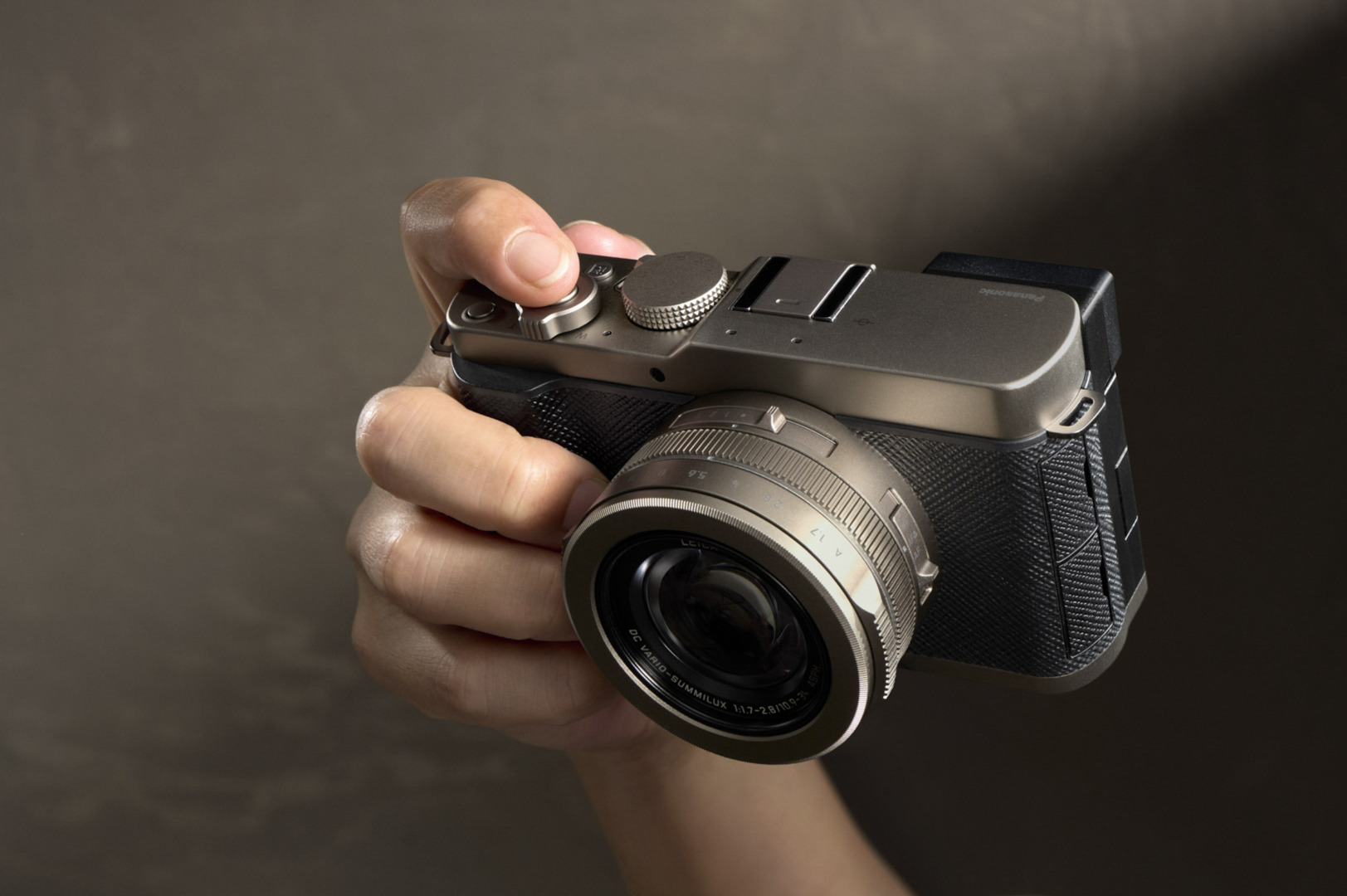
While this lens is identical in operation and performance to earlier iterations, there is one significant change. The slider switch on top of the lens, next to the body, has traditionally been dedicated to choosing one of four aspect ratios.
While this can still be done, the slider is now programmable and can also control the step zoom. Instead of the dedicated aspect-ratio legend, the slider now features four programmable options, ◉, 1, 2, 3. I will cover this in more detail in the step-zoom section.
The lens features a 43mm thread to accommodate filters or hoods. I normally screw in a clear UV filter. Apart from protecting the front element, this does help a little with reducing dust ingress. There is also the option to purchase an auto lens cap, but this is ugly and unwieldy and thoroughly ruins the looks of the camera. On the side of the lens is a slider for focus mode (MF, AF, Macro).
One thing that hasn’t changed from the earlier iterations is the slow zoom operation. This is a rather irritating features of the camera. The guys at L² technology should be putting their efforts into speeding up operations. But we’re stuck with it on the L10.

Autofocus
The phase-hybrid autofocus is a substantial improvement that has profound implications for your enjoyment of this camera
The much-improved autofocus is perhaps the most important step forward for the L10. The camera employs the same fast and accurate system as used on the flagship Lumix Micro Four Thirds cameras and some full-frame cameras, including the S1RII.
The phase hybrid AF with 779 focus points covering almost the entire frame is complemented by six effective AI-assisted subject detection modes (human, animal, car, motorcycle, train, and aeroplane). The camera uses machine learning to identify and track subjects and lets the camera lock on to specific parts of the subject, such as the eye or a helmet.
This is a substantial improvement that has profound implications for your enjoyment of the camera. It is a major step forward from the system employed on the earlier LX100-based cameras.


Step zoom
The step-zoom function forms one of my hobbyhorses. I just loved the feature on the D-Lux 7 and LX100 II. When set, the zoom would flick to nice round numbers such as 28, 35, 50 and 75, just as nature intended.
As a mild OCD sufferer, I cannot abide 27 or 56. It has to be spot on, preferably according to one of the traditional focal lengths, or I become fretful. Curiously, my local camera dealer tells me he takes the diametrically opposite view in his compulsion, invariably opting for 19mm or 48mm rather a round value. There’s no accounting for folk, I suppose.
Anyway, step zoom is A GOOD THING. I was mightily irritated when Leica deleted it from the D-Lux 8, having featured the system in earlier D-Lux models. I felt cheated, as did many D-Lux owners. As we know from our comments section, they were equally disappointed by Leica’s decision. Presumably the feature was stripped in the interests of Das Wesentliche. Big mistake, I thought at the time, and I still think.
Fixed focal lengths
Step zoom, unless you have never encountered it, is a system which allows the camera to jump instantly between fixed focal lengths. It can mimic the experience of shooting with multiple prime lenses. In doing so, it bypasses the standard continuous zoom and makes framing much faster. I truly like it.

Step back
Hallelujah! Panasonic has always supported step zoom on its LX range, and the L10 is no exception. It’s a slightly different iteration, but it’s good enough for me. There are two ways to use it. First, you can change the lens ring from smooth zoom to allow it to jump to the classic focal lengths. Moving the ring will toggle all the familiar numbers, although it can be a hit-or-miss, and it’s too easy to move on to the next focal length accidentally. The second option, as outlined above in the lens section, is to assign three preferred focal lengths to the slider switch on top of the lens.
Unlike stepping with the lens ring, this is an absolute setting. Choose 35mm or 50mm and the lens will remain at that focal length, even returning after a power cycle. In effect, this means that you can go out to play with one fixed focal length and imagine you have a prime lens attached. It’s good for the psyche and great fun to use. It’s also ideal for familiarising yourself with using fixed focal lengths. Moving the step control back to bullet point releases the setting, and you can then use the smooth zoom.
Here endeth the lesson on step zooming.

Processor
Here is the third vital ingredient in the L10’s sweetened pudding. The camera uses Panasonic’s latest Venus image processing engine, the same as that found in top cameras such as the full-frame Lumix S1RII and the Micro Four Thirds GH7.
This processor gives the compact L10 rapid speed, intelligent AI subject tracking and rich colour profiles, including the employment of real-time LUTs. Nothing to dislike here. Again, this is a massive step forward in capability compared with the LX100II and D-Lux 8.

Viewfinder
The 2.36 million-dot OLED finder has a magnification of 0.74x. It is clear and sharp, but it isn’t in the more desirable 3.6-5.6 MP range of current leaders. However, it is acceptable. It is steadier and more usable than the field-sequential finder in the earlier LX100 series. Nevertheless, Leica fans can be encouraged by the fact that this is apparently the same finder used in the current D-Lux 8, which is an improvement over the D-Lux 7.


Connections
The camera features USB-C for charging and data transfer. It supports USB Video Class (UVC) and USB Audio Class (UAX) so the camera can act as a USB webcam and audio device when connected to a computer. There is a 3.5mm microphone input but no headphone output. Wireless connection supports Wi-Fi 2.4 and 5 GHz, Lumix Lab, and Bluetooth.
Video
While we do not test video capabilities and concentrate instead on still photography, the L10 is by all accounts a serious video tool, thanks to V-Log, 10-bit and high-frame-rate 4K. The multi-aspect Four Thirds BSI CMOS sensor (derived from the GH series) enables true open-gate capture and consistent angle of view across aspect ratios. There is a multitude of informed articles and videos on this aspect of the L10. My take is that you would be pleased if you want to use this camera for general video or, even, vlogging. But, again, I haven’t tried it.

Storage
The camera has just one SD card slot, which is par for the course in compacts of this type. However, the card is accessed via a door on the base of the camera, similar to the arrangement on the Leica Q3, rather than being integral with the battery compartment. I much prefer the placement of this card door, and it overcomes my long-held prejudice that the combined battery and card slot design is well past its prime. The L10’s version, just like that of the Leica Q3, is the grown-up option. There is no internal memory, unfortunately, although neither do the Leica Q3s nor the Fuji compact cameras.
Battery
The Lumix L10 uses a high-capacity DMW-BLK22 battery (7.2v, 2200mAh, 16Wh). This is a significant upgrade over older compacts and allows all-day shooting without the need to recharge. The same battery is used in the Lumix S5 series and the S9, but also in the Micro Four Thirds GH series. This alone speaks for the sort of life you can expect from this battery, even without the statistics.


The battery has a CIPA rating of around 420 images using the rear monitor, or 410 images with the EVF. In power-save mode, with forced early sleeping, up to 1,000 images should be possible, according to Panasonic. In my time with the L10 I shot well over 1,200 images and I averaged around 350 images per charge, certainly more than enough for a full day. I didn’t employ extreme power-saving options, though.
Unlike with many compact cameras, such as the Ricoh GR or Fuji X100, there is less need to carry a spare battery. In fact, since this was a press-loan camera, I had no reserve battery available. I was forced to rely on my iPhone phone power bank for topping up, but it was never needed.

Comparisons
With the Lumix L10 and Fujifilm X100VI sitting side by side — they are very similar in size, as I’ve described — it is tempting to make comparisons. I’d also throw in the Fujifilm X-E5 and the 16-50 XF (24-75 full-frame equivalent) zoom, which mirrors the L10’s versatility.

The depth of the Fuji X-E5 combo, at full zoom, is 106mm compared with the deeper 118mm of the Lumix. However, the L10 is more compact when switched off. With the retracted zoom, it measures only 70mm. But, since none of these cameras is what one could call pocketable, the differences are marginal. The X-E5 is however definitely a contender in my book.
The Fujifilm X-E5 and 16-50 weighs 685g, while the Lumix is much lighter at 515g. The X100VI comes in at a handy 521g, marginally heavier than the L10, but this camera has to rely on digital rather than optical zoom for longer focal lengths.
The elephant in the room is that both Fujis have the larger APS-C sensor (368.2mm²) with a usable resolution of 40MP, while the Lumix L10 has a Four Thirds sensor (224.9 mm²) with an effective resolution of 20.4MP.
While the X100VI appears to be hobbled by its fixed 35mm focal length, the combination of the greater real estate and the higher resolution means that the Fuji can in theory equal the resolution of the L10’s digital zoom up to 50mm. However, due to the need for longer focal lengths at a given angle of view, the larger sensor gives a narrower depth of field, for better or worse.
At a crop to 75mm, on the other hand, the Fuji produces 10MP output, half that of the L10 with its optical zoom. And from 75mm upwards, digital crops mean that the L10 can in theory outperform the Fuji. In contrast, the Lumix L10 offers a consistent resolution from 24MP to 75MP thanks to the optical zoom. Overall, it is more versatile than the X100VI, although the Fuji is clearly the winner at wider angles.
In use
When I pick up the Lumix L10, it feels every bit the same as the LX100 and the D-Lux models. The added size and weight is soon forgotten because the camera just feels right. The built-in grip creates a stable basis for one-hand photography (with a wrist strap, for instance) and I would add to that by buying a thumb grip — something I use with almost all my cameras to increase stability. It is a very comfortable camera to hold and use.
This little camera is relatively unobtrusive and is a faithful companion for street photography, landscape, and general purpose photography. It attempts everything and, mostly, succeeds. I have no reservations about its claim to be the ideal, lightweight, travel all-rounder.

Autofocus
Autofocus is palpably much faster and more accurate than on earlier models, and it is now comparable with the company’s outstanding Micro Four Thirds cameras. It performs much better than, for instance, Fuji’s AF on the X100 and X-E5. The phase hybrid AF system with AI assistance is extremely fast and reliable. It removed much of the guess work out of focusing and allowed me to concentrate on composition and selecting the right moment to press the shutter.

The camera is also noticeably faster than the D-Lux 8 which I tested in August 2024. The Leica relies on older, slower contrast detection. The Lumix L10 boots up faster and tracks moving subjects more reliability because of the advanced processor.
These improvements are immediately obvious as soon as you start to use this camera. If you have been accustomed to an LX100 or D-Lux 7/8, the faster, more accurate operation will come as a welcome surprise. It will spoil you for the other cameras.
Low-light noise performance is good — ISO 3,200 is excellent and up to 6,400 still usable. Nevertheless, in darker situations, the AF exhibits some diffidence in locking on to subjects, with evidence of hunting. It didn’t worry me overmuch, but potential users should try this for themselves if they are concerned.
Controls and menu
I am happy with the controls, which are more prolific than those on the “essential” D-Lux, but, in their way, appealing. If you like the more traditional approach to buttons and dials, the Lumix will suit you.
The instantly selectable custom settings on the mode dial proved to be a major advantage, encouraging me to set up and use profiles. It prompted me to change them frequently to handle different types of subject and environment. While other cameras offer similar functions, the selection is often confined to the Q Menu and that can act as a disincentive to change.
I should say that this direct access to profiles is nothing new. The little Ricoh GR, for instance, has always had a similar set-up, and it is common on other cameras. But it is a complete change from the one-trick-pony shutter-speed dial that has always been so popular. Perhaps it’s time to change our outlook.

The Panasonic menu system is not my favourite (Leica has the best there is, I believe), but the flexibility of the Quick Menu and My Menu means that you can group all the most important functions for easy access.
The optics
The lens is a known quantity for most of our readers. It is sharp and virtually free of aberrations apart from a slight softness in the corners of the image which I didn’t detect with the D-Lux 8.
The fast light-gathering f/1.7 maximum aperture allows a decent amount of subject separation, although the depth of field at any aperture is far wider than you would get from an equivalent full-frame lens, and also significantly behind an equivalent APS-C lens.
The comprehensive zoom range, from 24 to 75mm, is a decided asset, preserving the full 20.4MP resolution throughout. While you can crop a fixed focal length camera image, there is no real substitute for a true optical zoom. And, crucially, what you cannot do is un-crop a fixed focal length.
These days, 24mm is such a popular focal length for city and architectural photography. And in this respect, the L10 gives you maximum versatility. In contrast, using other fixed-lens cameras such as the X100 series (35mm) or the Q3 (28mm) can sometimes be frustrating in city streets.
Moreover, if you do like to crop, the 20.4MP resolution at 75mm is good enough for digital cropping to 90mm or even 120mm. See some 150mm digital crops later in this review to demonstrate what is possible. With a fixed lens camera, such as the Fuji X100VI or, even, the Leica Q3, it is the law of diminishing returns when cropping savagely.
Photo styles
The camera includes baked-in “photo styles”, which provide the starting point for in-camera development. The full selection is as follows:
| Standard | Vivid | Natural |
| L.Classic | L.ClassicNeo | L.ClassicGold |
| Flat | Landscape | Portrait |
| Monochrome | L.Monochrome | L.Monochrome D |
| L.Monochrome S | Leica Monochrome | Cinelike A2 |
| Conelike D2 | Cinelike V2 | Like709 |
| V-Log | Standard (HLG) | Monochrome (HLG) |
| Real-time LUT | Hybrid Log Gamma | My Photo Style 1-4 (up to 10) |

I used several of the above styles in the demonstration images in this article, and they are marked accordingly in the captions. The film-inspired highlights are interesting and will give hours of fiddlesome fun.
All the styles can be fine-tuned, of course, and the setting shifts depending on whether a LUT is layered on top. Also included are dedicated filter-style effects such as Sepia, Cross Process, Retro, Old Days and Bleach Bypass.

On top of all this, you have access to LUT recipes. Look-Up Tables are pre-built sets of instructions telling the camera how to remap and render colours and tones in a photo or video. You can download hundreds of LUTs from the excellent Lumix Labs companion application. The dedicated LUT button on the back of the camera gives instant access without ploughing through menus.
In the week I had with the camera, I didn’t have an opportunity to delve into this fascinating subject, although I did download a hundred or so LUT recipes just out of curiosity. There is a lot to get to grips with and, if you become an owner, it will be worth putting in the effort. It is important to note that if you use the camera with Lightroom, the photo styles are always available to apply to RAW files. This is similar to the way in which Fujifilm cooperates with Adobe and, in most cases, I used the L10’s camera photo styles when editing the pictures for this article.

Round up
I can fully understand the excitement the Lumix L10 has caused among fans of compact cameras. While I do not think it will knock the X100VI off its sales perch, it does present a more versatile and ultimately more satisfying prospect for compact fans. To have all this, including state-of-the-art AF, in one package is seriously good. And by today’s standards, the £1,300 price tag is acceptable for what you get.
What of the Leica D-Lux 8? Well, if you are thinking of buying one, I would think twice. I’d wait a bit to see what happens. The Lumix L10 is better than the D-Lux 8 in all the ways that really matter. It has significantly improved image quality and vastly superior, faster autofocus and subject recognition. Even the red dot, the sleeker lines and the “Leica dust” cannot compensate for this. Buy the DL8 only if you must have a Leica and smaller package, if you can live with the compromises, and if you are not willing to wait for a possible D-Lux 9.




Could this be the Leica D-Lux 9?
What you can’t avoid, though, is the suspicion that the Lumix L10 is very likely to become the D-Lux 9. I have absolutely no inside knowledge or tips, but it’s logical to me. I could be wrong, but I cannot imagine Leica continuing to market a hobbled smaller-bodied camera with all its heat-dissipation compromises now that such a compelling alternative exists.
The L10 is almost a ready-made package that Leica could adopt. Leica would change things along the way, and certainly the Leica menu system would be a major improvement. In itself, the menu system could almost justify extra cost. But I would be disappointed to see the built-in grip and the step zoom jettisoned in the interests of Das Wesentliche. If they do that, I’d take the Lumix L10, menus and all because it is a really excellent compact for general travel.
A Leica version might give you extra kudos (and the warm feeling that comes with the knowledge of owning something out of the ordinary). And, of course, Leica fans will tell you it is far superior to the humble Lumix L10. You could believe that is true, but it would be difficult to improve on the L10 in operation and usability.


Bottom line
The Lumix L10 is a superb travel camera that does everything you could reasonably expect in a compact design. If you buy it, you will not be disappointed. Sure, you could be swayed by the undeniable allure of an alternative such as the Fujifilm X100VI or, even, a Leica Q3. Or you might want to wait for the red dot version. But this is the compact camera of the moment. It’s the one you will throw in your bag without a thought, and the one that will never disappoint. I’d go for it.
| Macfilos review of the Leica D-Lux 8 | D-Lux 8 loses popular features in quest for “the essential” |
| Panasonic Lumix LX100II: Is it worth upgrading | Leica D-Lux (2015) review |
Make a donation to help with our running costs
Did you know that Macfilos is run by five photography enthusiasts based in the UK, USA and Europe? We cover all the substantial costs of running the site, and we do not carry advertising because it spoils readers’ enjoyment. Any amount, however small, will be appreciated, and we will write to acknowledge your generosity.
hi
just leaving my fuji gear at 81 and with an ankle op due any time carrying two bodies and five lens (not all in one go) was now to heavy so have bought the Lumix L10 anniversary version can you help or point me in the right direction as to how to set the camera up COVID 19 has hit my memory out of the window so a simple everyday set up would be great till I get into the workings
Dennis
Dear Dennis, Sorry to hear about your problems, but the Lumix L10 is a super little camera for general use and it is quite light. I reviewed a Panasonic loan camera which I was able to keep for two weeks, but unfortunately we don’t have an example here at Macfilos. I can’t therefore give you an easy set up guide, although there must be many available on the internet. I did a search and came up with this article which could be helpful:
https://martinbelan.com/2026/06/27/how-to-customize-the-panasonic-lumix-l10-quick-menu/
Mike
Your typical expert review that does not try to sell it to everyone. I wish I was 25 percent as verbose as you. When I write a thank you note I have trouble getting past thank you. I am still working on an article for over a year but it is hard to be motivated. It is similar to my wife working in the kitchen for hours and then she is irritated when I consume and enjoy it in a very short period of time of time.
Don’t worry, Brian. All these articles take a lot of time. It is also often a challenge to get decent example shots in a short time. It’s easier in many ways to deal with cameras and lenses I’ve purchased. After a time, though, you realise that every review you do gets somehow easier. At least that’s my story and I’m sticking to it!
Every so often, I think “I should write a review of this.” But, coming to MACFILOS and reading the posted magisterial reviews disabuses me rather quickly — kudos to all the thoughful, knowledgeble people here.
I like the fact that this review has avoided the ‘who is this for’ connundrum — other reviewers calling it a ‘do-everything’ camera. As my gal Ferron sang “Choice carves a crevice where a river could flow/It can seal up a highway so a shadow can’t go”. That is, if you choose to have a PASM dial, then you don’t have a shutter speed dial. More than that though: the camera is designed for people who will use modes like ‘A’. If your top plate has a display of color modes, then you likely not have room for a higher-resolution EVF. And again, the camera will attract people who may not use an EVF, preferring a back screen or auto-focus.
Choices. Or as Alan Kay said ‘Easy things should be easy; hard things should be possible.” The design of the camera determines which is to be which.
Now I have to make a confession: when I read the term “selfie” I become posessed by an evil grannie spirit: the type who would have welcomed Barnack with “Film?! Like them moving pictures? Glass plates were good enough for grand-uncle Josef and they’re good enough for me.”
Or, less obtusely, it seems to me that many of the choices made in the latest round of compact cameras reflect an intended purchaser who wants quick ways of generating photos to send online. There’s clearly a market for such cameras, and it would be foolish for manufacturers to ignore it.
For myself — my great uncle Josef….
Thanks, Kathy, and I note your sensible points. I don’t like “selfie” any more than you do, but it’s now so common that it would be a bit pretentious to say “self-portrait”. Or maybe I should try to set standards! The odd thing about reviewing cameras and lenses is that things seem to get a bit easier every time — and there are always new techniques and layouts to try. I used to delay and delay, feeling overwhelmed by the task in hand. Now I split it into sections and work on them bit by bit. I have a nice template with all the headings, so it’s just a matter of writing a few words!
One of the biggest time-consumers is in selecting the images, importing them to the site and adding all the metadata that Mr Google seems to insist on. In this respect, we’ve improved our attention to detail over the past few years. Adding caption material, which involves going back to original images to get exposure details, is also very time consuming. But we get there in the end.
Thank you Mike for your gargantuan review of the latest Lumix compact camera. 26 side-headings, if I am not mistaken! When the L10 was announced I was sorely tempted.
Then I reminded myself that I was still enjoying my ten-years old predecessor; even discovering the potential of iZoom. But then I reminded myself that I am no longer globe-trotting and have no need for such an upgrade.
As I was reading your detailed review, I couldn’t help thinking that you have basis there of an e-book, should you be so inclined.
Thank you for your daily dollop of the latest developments in compact camera technology. Much appreciated!
Thank you, David! I am noted (among colleagues) for verbosity (and. incidentally, the overuse of the passive voice, which seriously annoys my colleague Keith James who is very active). I make no excuses: I like passive voice, and I can’t avoid being verbose. Unfortunately, tests of cameras and lenses set me off. Before I know it, I’ve polished off 5,000 words when colleagues would be perfectly happy with half that count. I am a lost cause. Mike
Dear Mike, I’d like to compliment and thank you for the interesting and detailed report on the new Panasonic camera.
It’s an exciting concept—not for me, as I’m sticking with my Q3s—but certainly for people looking for a compact camera suited to every photographic situation.
I find it remarkable that compact cameras are evidently enjoying great popularity, contrary to predictions made just a few years ago and despite the ever-improving image quality of smartphones. Leica, Sony, Panasonic, Fuji, and Ricoh are offering the market interesting products ranging from MFT to medium format—exciting stuff!
Thank you, Olaf. I really enjoyed the L10, especially because it embodies all the DNA of a D-Lux and is therefore familiar territory. The current market is indeed very interesting, but it seems to be steered by all these “influencers”. Many are very knowledgeable, of course, but others are opportunists who really have no in-depth knowledge of the subject. Yet they have influence and can change the market.
Nevertheless, It’s good that we have so many choices and are able to make up our own minds.
Excellent review Mike, thanks!
Thank you. Glad you found it useful. Mike